Posts

MVA Office Hours - Windows Server 2012 and Windows 8 - Get your technical questions on Windows Server 2012 and Windows 8 answered live

MVA Office Hours - Windows Server & Client January 15, 2013 8:30-10:00am PST Register Now: Space is Limited! The Microsoft Virtual Academy (MVA) team is hosting a live online discussion designed to enable experienced IT Pros to ask technical questions regarding Windows Server 2012 and Windows 8 . This exclusive session will feature two of Microsoft’s most popular personalities from " The Edge Show " -- Senior Technical Evangelist  Joey Snow -- Senior Technical Evangelist  Rick Claus  Both will be engaging in dialog, debate and demos shaped by a global audience of esteemed IT Pros.
Microsoft News regarding Microsoft Surface With Windows RT and new Retail Store locations

I wanted to make sure our followers were up to date on some of the newer Microsoft news releases regarding the expanded retail distribution for Microsoft Surface with Windows RT; as outlined in their recent post . At the same time another announcement was made regarding information about newly planned Microsoft Store locations for 2013 which include locations in: --  The Shops at La Cantera, San Antonio, Texas --  Dadeland Mall, Miami, Fla. --  Beachwood Place, Beachwood, Ohio --  Westfield San Francisco Centre, San Francisco --  City Creek Center, Salt Lake City --  St. Louis Galleria, St. Louis The announcement was made by Jonathan Adashek General Manager, Communications and Strategy, Sales & Marketing Services Group, Microsoft on the Official Microsoft Blog

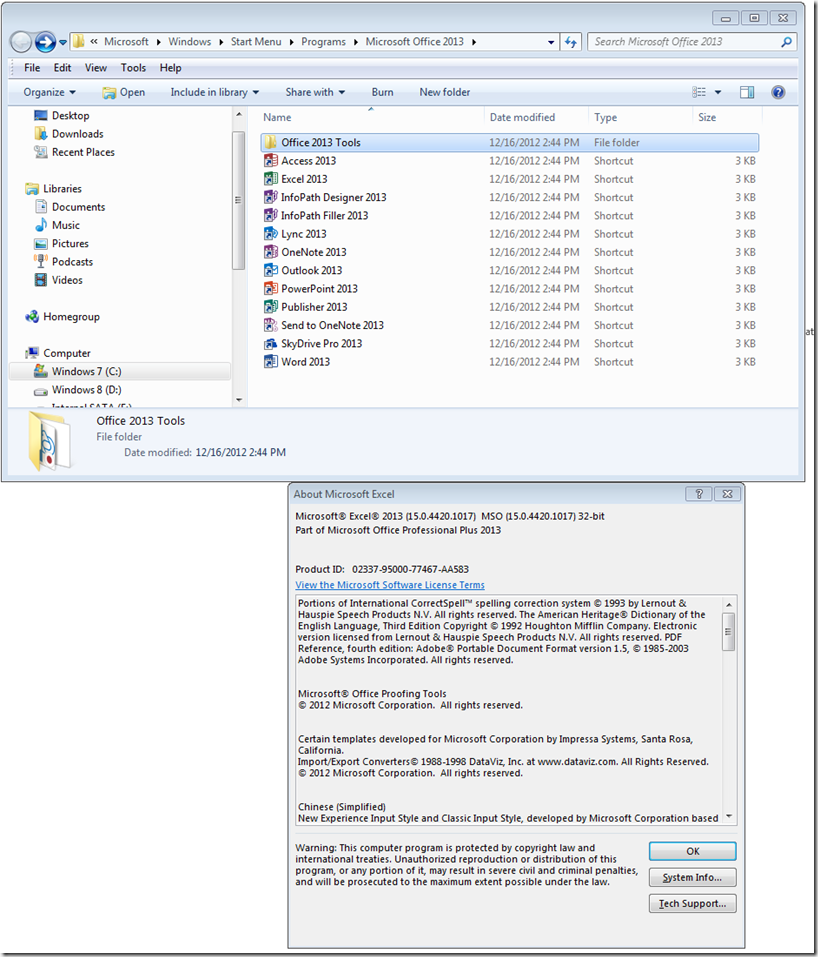
Installing Office 2013 on a rainy Sunday afternoon

Image

Free Windows Server 2012 Learning - courtesy of the "Absolute SharePoint Blog" Part 2

Vlad Catrinescu (MCITP, MCSA) has numerous links to all kinds of Windows Server 2012 training on his blog via a post entitled Free Windows Server 2012 Learning Material & Resources! Part 2. Yesterday I posted the "part one" page of his efforts. I wanted to cross post his link to “Part 2” so that everyone here has a reference for all the additional material he's provided. For his “Part 2” page he put up some collected links for the CERTIFICATIONS themselves including additional study materials and the information on the second shot program for the exams. He has another DOWNLOADS section as well as references for study materials with respect to some TEST LAB GUIDES and the WINDOWS SERVER 2012 JUMP START program. Without a doubt this is worth a repost and another shout out - thanks Vlad for pulling all of this into one place for everyone to reference!

Free Windows Server 2012 Learning - courtesy of the "Absolute SharePoint Blog" Part 1

Vlad Catrinescu (MCITP, MCSA) has numerous links to all kinds of Windows Server 2012 training on his blog via a post entitled Free Windows Server 2012 Learning Material & Resources! Part 1 I wanted to cross post his link (and I'll be doing so with his part two page tomorrow) so that everyone here has a reference for all the material For the most part, he has combed through the free material for Windows Server 2012 on Microsoft Download Center as well as via the Microsoft Virtual Academy (MVA) site as well. He has a DOWNLOADS section as well as references for study materials and sections laid out for VIRTUAL LABS as well as the material as laid out via the Microsoft Virtual Academy. Without a doubt this is worth a repost and a shout out - thanks Vlad for pulling all of this into one place for everyone to reference! 

Windows 8 Features by Edition (70-687)

There are a total of four versions of Windows 8: Windows 8 Windows 8 Pro Windows 8 Enterprise Windows 8 RT Windows RT is available as the pre-installed operating system on Original Equipment Manufacturer (OEM) devices such as tablets, convertibles and other systems powered by ARM processors. As an end consumer you can’t purchase Windows RT separately and install it on your own. Windows 8 and Windows 8 Pro can be found preinstalled on PCs, portable computers (laptops, convertibles, etc.) and workstations that run the x86 and x64 processor lines from AMD and Intel. Consumers are also able to purchase the operating system for from retail outlets and the Windows Store. Both Windows 8 and Windows 8 Pro are available in 32 bit and 64 bit editions. Windows 8 Enterprise edition is available to Software Assurance customers via the Volume License Service Center (VLSC) . Customers who are interested in trying out the key feature...

Windows 8 system requirements (70-687)

As published at http://windows.microsoft.com/en-US/windows-8/system-requirements If you want to run Windows 8 on your PC, here's what it takes: Processor: 1 gigahertz (GHz) or faster with support for PAE, NX, and SSE2 (more info) RAM: 1 gigabyte (GB) (32-bit) or 2 GB (64-bit) Hard disk space: 16 GB (32-bit) or 20 GB (64-bit) Graphics card: Microsoft DirectX 9 graphics device with WDDM driver Additional requirements to use certain features: To use touch, you need a tablet or a monitor that supports multitouch (more info) To access the Windows Store and to download and run apps, you need an active Internet connection and a screen resolution of at least 1024 x 768 To snap apps, you need a screen resolution of at least 1366 x 768 Internet access (ISP fees might apply) Secure boot requires firmware that supports UEFI v2.3.1 Errata B and has the Microsoft Windows Certification ...